Professional Personnel Tracking System

Deploy isolated, high-performance community roster systems. Manage employees, awards, ranks, qualifications, and forms from a premium glassmorphic dark-themed dashboard.
Explore Features Below
Showcase
Roster Dashboard

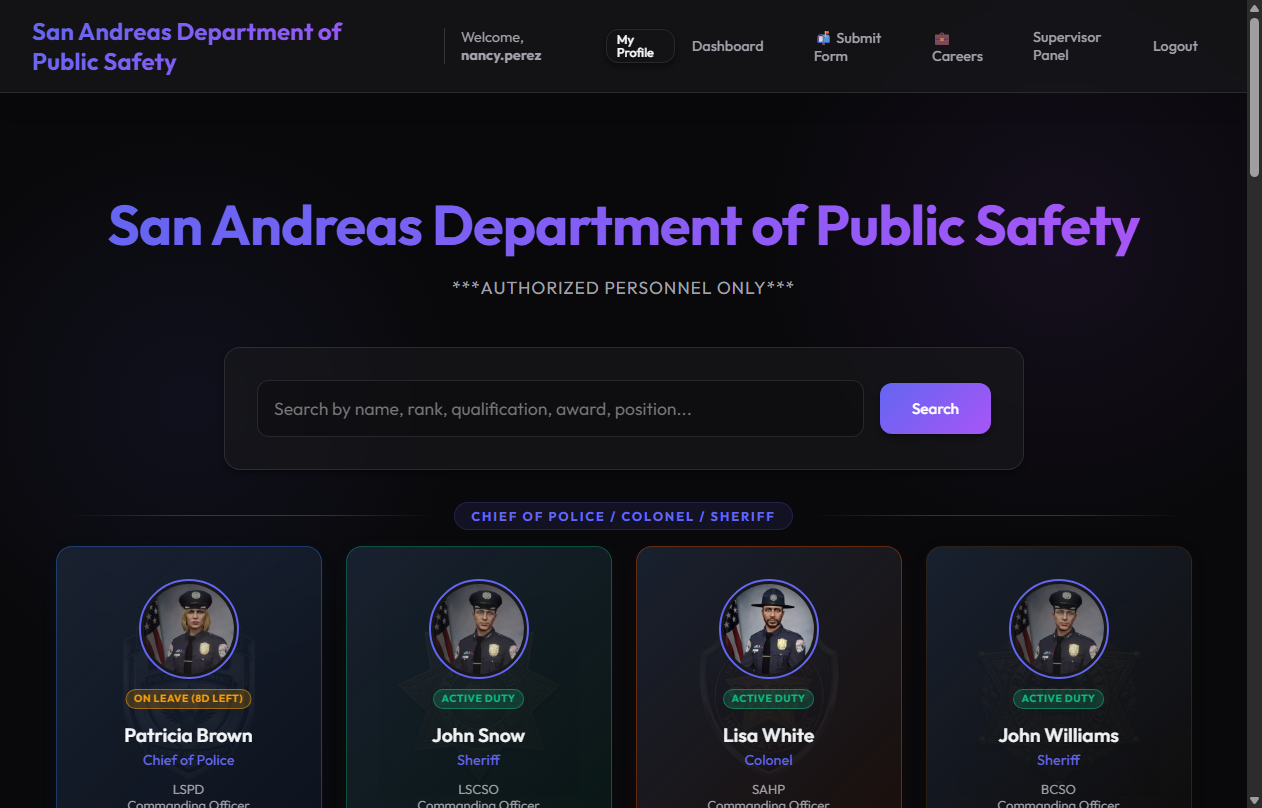
Central Roster Index

High-fidelity central dashboard categorizing community employees by rank levels. Features integrated department cards and live active duty status indicators.

PTS Core Architecture Features

đŸ‘Ĩ

Roster Management

Complete profile pages with Discord/Teamspeak integration, start date, service timers, leave countdowns, and built-in photo upload with cropping tool.

🏅

Ribbon Rack Engine

Military-style awards rack. Automatically nests duplicates, indicates duplicates with gold stars, shapes racks as centered pyramids, and displays hover tooltips.

đŸ“Ŧ

Forms & PDF Engine

Allow employees to submit customizable form templates (e.g. Leave, Incident). Supervisors review forms, and the app compiles them into clean, exportable PDF documents.

đŸ’ŧ

Careers Landing Pages

A landing section for each department displaying active postings. Auto-detects Commanding Officers (CO) and second in charge, and displays employee spotlights.

🔒

Clearance Levels

Enforces supervisor scoping. Supervisors manage employees scoped to their department, while standard users see sensitive details masked.

📈

Active Promotion Logs

Color-coded career logs tracking rank history. Demotions reflect in yellow, resignations in green, and administrative discharges in cyan.

Sleek Stack & Security Clearance

The PTS platform leverages a highly optimized Python-based stack designed to support fast page loads, dynamic connection routing, and robust process control. Built to be modular and secure, it enforces strict departmental security restrictions.

🐍

Python / Flask

Modular blueprints and context processor architecture

đŸ›ĸī¸

Dynamic SQLite

Dynamic engine bind routing for absolute data isolation

🔒

Clearance Levels

Role-based scoping rules masking Steam HEX, Discord, and Teamspeak

🎨

Glassmorphism UI

Outfit/Space Grotesk fonts, dark-mode gradients, and animations

Personnel Tracking System

  • 👋 Welcome
  • 📸 Real App Screenshots
  • đŸ‘Ĩ Roster Dashboard
  • 👤 Officer Profile folder
  • đŸ’ŧ Department Careers
  • đŸ“Ŧ Form templates constructor
  • 🔑 Supervisor clearance
  • âš™ī¸ Admin Panel

Welcome to the Sector 6 Networks PTS Tour

This interactive presenter will guide you through the features of the Personnel Tracking System and the Instance Manager. Enabling the Voice Tour Guide below will narrate the features aloud.

  • Fully integrated community roster database.
  • Pyramid-rendered military awards engine.
  • Role-scoped permissions restricting access.
đŸ›ī¸

Sector 6 Networks

PERSONNEL TRACKING SYSTEM

Interactive Product Overview

Real Application Screenshots

Browse through high-fidelity screenshots captured directly from the live Personnel Tracking System and settings console.

Showcase Image

Central Roster Index

This replica demonstrates the real dashboard grid. Ranks group automatically under visual separating ribbons, and department cards feature customized color gradients and branding logos.

  • Gradients: Orange for SAHP, green for LSCSO, blue for LSPD.
  • Dynamic Search: Search dynamically filters matching names or departments.
  • Global Stats Card: Shows live counts for employees, leaves, and forms.
Total Force
5
On Leave
1
Active Cases
0
Sheriff / Chief
Supervisors & Deputies

Officer Profile Folder

Detailed personnel card listing qualifications, service times, and interactive ribbon racks.

âš™ī¸ Commander Controls:
✂ Crop Profile Avatar

Drag the zoom slider to crop the employee avatar.

👤
👤

Sheriff Hunter

Sheriff
ACTIVE DUTY
Service Time:
1 year, 2 months, 4 days
Qualifications
Personnel Log (Historical Audit)

Department Careers Portal

This replica models `careers_landing.html`. It parses rank hierarchies to auto-detect the Commanding Officer (CO) and second-in-charge (DCO) dynamically.

  • Open Job Listings: Shows open postings with vacancies count.
  • Employee Spotlight: Auto-displays spotlighted division members.
  • Careers Link Workflow: Click "Apply for Posting" to route to Slide 5 and pre-populate template fields.
Command Hierarchy
Commanding Officer (CO): Sheriff Hunter
Second in Charge (DCO): CSM Miller
Active Job Openings
Trooper I Recruit
Vacancies: 3 positions open
⭐ Division Spotlight
đŸŽ–ī¸
CSM Miller
Selected for outstanding support during joint-division training exercises.

Custom Forms & PDF Engine

This slide replicates `submit_form.html` in action. Employees choose templates to submit, and supervisors process approvals to trigger PDF compile downloads.

  • Constructor toggles: Choose fields to dynamically inject into the active form template.
  • Supervisor Approval Panel: Simulates the command review queue.
  • Report Exporter: Downloads the compiled file containing the document's SHA-256 hash.
âš™ī¸ Custom Fields Template Constructor:

đŸ“Ŧ Interactive Form Submission Demo

Ready to submit form. Fill details and click Submit.

Supervisor Review Portal Required:

Supervisor Clearance Scoping

This demo mimics the permission restrictions of the app. Standard users see masked placeholder labels on sensitive profiles, and supervisors are restricted to scoping staff belonging to their own department.

  • Standard User: Sensitive profiles masked.
  • SAHP Supervisor: Accesses and edits SAHP records; LSPD records remain masked.
  • Global Admin: Unlocks all department databases and credential columns.
🔑 Switch Viewer Security Role:

đŸ‘Ĩ Scoped Roster Index (Clearance: Global Admin)

Admin Settings & Configuration

Replicates the settings page (`admin_settings.php`). Configure site branding globally, test database engine binds, and define logging parameters in real time.

đŸ› ī¸ Site Branding & Logo Symbol:
đŸ›ĸī¸ Database Connection Engine:
âš™ī¸ Log Activity Filters:

đŸ‘Ĩ Deploy Officer to Live Database

📋 Log Audit Entry to selected

Console ready. Awaiting inputs...
Zoomed view